
Insights · care ·
Care plans that actually pay off: what to expect from managed WordPress hosting
What a real WordPress care plan should include, versus what €5/month hosting actually gets you. Real numbers, named CVEs, honest SLAs, and the cost of finding out the hard way.
TL;DR
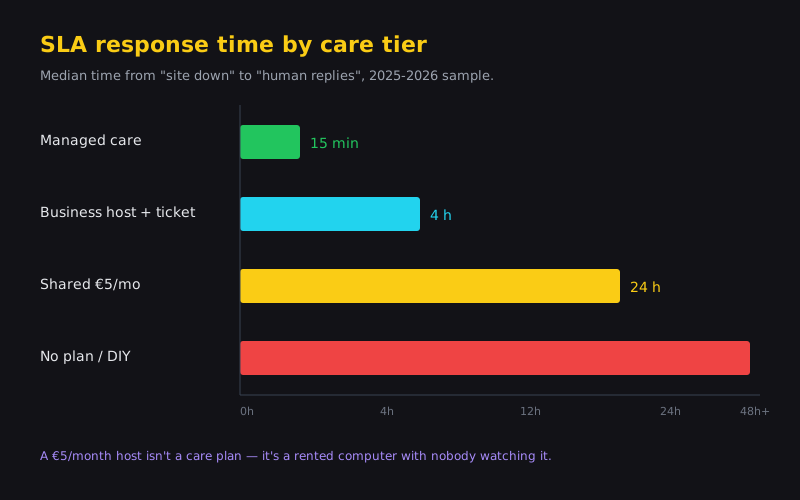
- €5/month hosting isn’t a care plan — it’s a rented computer with nobody watching it.
- A real care plan bundles staged updates, off-host daily backups, 60-second uptime monitoring, tracked security patches, and a human on incident response.
- A hotel in Bled lost several thousand in reservations over three days after an Elementor auto-update — because a few euros a month of hosting didn’t include anyone checking.
- If you run WordPress or WooCommerce and have no in-house IT, care pays for itself the first time it prevents an incident.
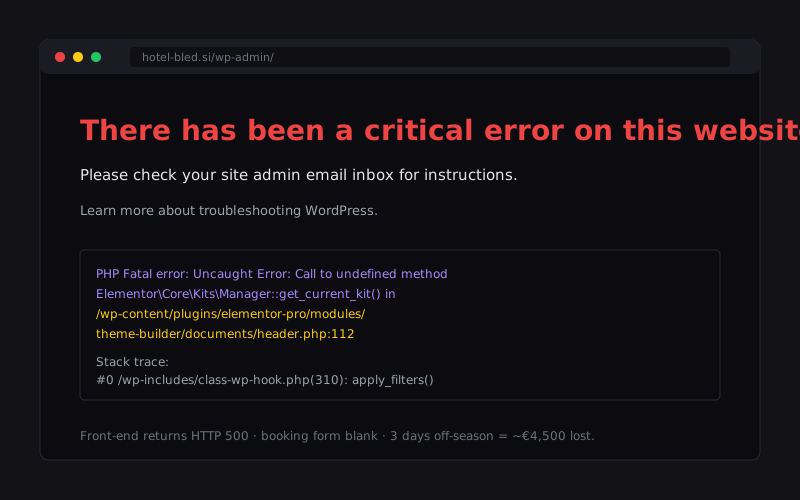
Illustrative composite from repeated client patterns; details anonymised. In March 2024 a small hotel in Bled took zero online bookings for three days. Not because there were no guests. Because Elementor Pro pushed an overnight auto-update that broke the front-page template, the booking form returned a blank white screen, and nobody on staff noticed until Wednesday morning — when a guest phoned to ask why the site wouldn’t load. Three lost days. Off-season, so the shortfall came to several thousand in missed reservations. Their hosting bill was a few euros a month.
That’s a fine price for hosting. And an expensive price for the absence of care.
Warning: €5/month WordPress hosting looks like a saving until an auto-update breaks the checkout on a Saturday. The composite above lost several thousand in three days — many multiples of their annual hosting bill — because nobody was watching.

What “hosting” alone actually is
Hosting at €4–15/month with a Slovenian provider like Domenca or Neoserv, or an international one like Namecheap, is not a small service — it’s a small definition. You buy disk space, a PHP interpreter, a MySQL database, and an auto-renewed SSL certificate via Let’s Encrypt. Some throw in a basic cPanel and one-click WordPress install. That’s it.
Really.
Nobody’s watching when your site crashes at 22:47 on a Sunday. Backups are stored on the same server as your site, which means you lose both if the disk fails. Nobody checks whether last night’s WordPress core update broke your payment gateway. There’s no monitoring for whether a security plugin is blocking attacks — because no security plugin is installed unless you installed one.
You’re the sysadmin. That’s fine, until you didn’t know that.
What breaks first when you’re the sysadmin
A few things reliably break on unattended WordPress inside the first year. The order is almost always the same.
Plugin auto-updates. Elementor ships 3.24.0, your custom CSS breaks, calls to action disappear from the header. WordPress core jumps to 6.7 and two older plugins are no longer compatible — the admin dashboard returns “There has been a critical error”. The SSL certificate should auto-renew, except Let’s Encrypt validation fails because someone moved a DNS record six months ago and nobody checked. The credit card on the hosting invoice expires. The invoice goes unpaid.
A pattern we’ve seen more than once: a WooCommerce site suspended for over a week because an unpaid hosting invoice was going to an ex-accountant’s email. The bill in question was tens of euros; the lost sales, when we ran the customer’s own averages, were in the low four figures. The maths on care-vs-no-care rarely leaves the room.
The security curve
WordFence Premium blocked 1.2 billion attacks against WordPress sites in 2024 (WordFence 2024 threat report). Not a million. A billion, with a B. That’s 3.3 million attacks per day, distributed across tens of millions of vulnerable sites. Your hotel in Bled, your dental practice, your Kranj shop — all in that rotation.
Specific CVEs from the past year that were actively exploited:
- CVE-2024-28000 — LiteSpeed Cache, an extremely popular caching plugin, XSS vulnerability affecting five million sites. A single request could grant administrator privileges.
- CVE-2024-2879 — LayerSlider, a slider plugin bundled with many themes and running on over a million active sites, critical SQL injection (CVSS 9.8). One unauthenticated request could extract admin credentials from the database. Disclosed 25 March 2024. If you’d disabled auto-updates and delayed the patch, scanners hit you within 48 hours.
- CVE-2020-25213 — the File Manager plugin, four years old, still actively exploited in 2025. Because half the sites running it never updated, because nobody administers them.
What does the free WordFence Free catch? Known attack patterns, brute-force login attempts, basic file integrity scans. What does it not catch? Zero-day vulnerabilities (until a rule ships), malicious insertions into existing files without size changes, use of a stolen admin session. Sucuri is roughly the same story. A serious site needs Premium licenses — WordFence Premium is around $119/year — plus a human who reads the reports.
Uptime is not a mathematical curiosity — it’s something you pay for in lost customers. 99.9% uptime means 8.76 hours of downtime per year. That’s most of a working day. 99.99% is 52.6 minutes per year, the difference between “we noticed” and “a guest noticed and posted on TripAdvisor”. Cheap hosts advertise 99.9% but without an SLA in the contract — breach it and you get an apology, not a refund. (If you’re weighing local vs overseas, we go deeper on that in EU vs US hosting for SI SMBs.) Kinsta’s $35/month Starter tier commits with a clear clause. WP Engine at $30/month Startup is similar. Cloudways at $14/month on Vultr HF is looser but realistically hits 99.95%.
What a proper care plan should include
| Feature | €5/mo hosting | Numen care plan |
|---|---|---|
| Plugin & core updates | You do it (or don’t) | Weekly, staged, smoke-tested |
| Daily off-host backups | Same-disk snapshot, if any | S3 / Wasabi / Backblaze, monthly restore test |
| Uptime monitoring | None | 60-second checks, SMS alerts to a human |
| Security patching | Auto-update roulette | Tracked CVEs, staged rollout |
| Incident response | Support ticket queue | 4-hour SLA (24/7 on the e-commerce tier) |
Not three items. Not five. Those are round numbers agencies write because they look tidy in proposals. The real number is seven things that actually prevent an outage.
- Weekly plugin and WordPress core updates, tested on a staging environment first with a manual smoke check on critical flows.
- Daily incremental backups via UpdraftPlus Premium or BackWPup, stored off the host (S3, Wasabi, Backblaze), with a monthly restore test.
- Uptime monitoring on a 60-second interval with SMS alerts — not just email, SMS, because nobody reads email at 3 AM.
- A dedicated staging environment for tricky updates, reachable at
staging.yoursite.combehind basic HTTP auth. - Minor content edits included — typically 2–4 hours/month for typos, photo swaps, adding a new team member.
- Performance monitoring with Query Monitor and weekly LCP checks via PageSpeed Insights.
- A monthly report with actual numbers: attacks blocked, backups restored (as tests), updates applied, minutes of downtime.
The last one matters. If you don’t receive a monthly report, you don’t know whether the care plan is happening.
What it should not include
This is where misunderstandings live. Care is not development. Care is keeping alive. New features are not care. A redesign is not care. Migration to a new host is not care. A custom WooCommerce integration with a new payment gateway is not care. All of those are separate quotes, billed hourly or as a fixed-scope project — not included in a monthly retainer.
If an agency tells you “everything is included in care”, ask what happens when you want to add a second language in six months. If the answer is “no problem, included”, they’re either lying now or lying then.
The math
Let’s do honest numbers for an SMB running a WordPress site with a contact form, a WooCommerce store with ten products, and bilingual content.
Bare hosting: €7/month, €84/year. Your own time as the owner: 10 minutes weekly to run plugin updates (if you do), 30 minutes monthly to check backups (if you do), occasional panic when something breaks. Say your effective hourly rate is €50 (low for an owner). That’s about €433/year in your time. Add the cost of one incident — restoring a hacked WordPress site runs €800–2,000 in agency time, plus the revenue you lose while it’s down.
Total: somewhere between €1,400 and €3,000/year, plus the risk of zero revenue during an outage.
Managed care at a typical Slovenian agency: €50–80/month, so €600–960/year (Numen’s own monthly plans are listed on the website page). None of the above — no owner time, no panic, no incident. The price is transparent and lands in your monthly operating spend.
For a shop taking payments, the math isn’t close. Care pays back inside one prevented incident.
Response time matters more than “24/7”
Everyone promises “24/7”. Nobody explains what it means at 22:47 on a Sunday.
A “4-hour SLA in business hours” is not the same as a “4-hour SLA 24/7”. The first means if the site goes down at 17:00 on Friday, you might get an acknowledgment Monday morning. The second means someone has a pager on. Numen care on the e-commerce tier operates 24/7 with a real human responding inside four hours, because we run a rotation. Care on the brochure tier operates in business hours, because a missing hero image on a law firm’s site does not need someone waking up at 3 AM on Saturday.
What does a monitoring incident actually look like? At 03:12 an alert fires because Pingdom sees an HTTP 500 on two consecutive checks. SMS hits the on-call engineer. They SSH in, check error_log, discover that a new WooCommerce Payments plugin build broke on PHP 8.1, deactivate the plugin via WP-CLI, restart PHP-FPM. Site’s back in 18 minutes. The next morning it goes into a proper post-mortem and a manual patched update. That’s an incident. Not “we sent an email to support and are waiting”.
When cheap hosting is fine
We don’t want to overstate this. For plenty of sites, €4 hosting at a budget provider is genuinely fine:
- A personal portfolio with ten visits per month.
- A static brochure for a craftsman who does everything by phone from a home workshop.
- Testing subdomains and staging environments for other projects.
- Family sites, hobby clubs, small associations without transactions.
For anything taking bookings, orders, or lead-form submissions that produce revenue — cheap hosting without care is deferred risk. The question isn’t whether there will be an incident. It’s when.
FAQ
What’s the difference between hosting and care? Hosting is infrastructure — disk, CPU, memory. Care is a human watching what happens to that infrastructure. One is a computer service, the other is the service of someone who understands the computer.
Do I need backups if my host offers them? Yes. Backups your host stores on the same server as your site are like spare keys left in the lock. If the disk fails or an attacker gets in, both go. A proper care plan stores backups off-host — on Wasabi or Backblaze — and does a monthly restore test on staging.
What if my site goes down at 3 AM? Depends on the plan. 24/7 care means SMS to an on-call engineer with a four-hour response even overnight. Business-hours care means you wait until morning. For a shop taking international payments, 24/7 is justified. For a law office open 8 to 4, probably not.
How often do WordPress sites get hacked? WordFence blocked 1.2 billion attacks in 2024 (WordFence 2024 threat report). An average unmanaged WordPress site is compromised within 6–18 months, usually through a popular plugin. If you take payment cards, PCI-DSS gets involved, and your acquirer will freeze settlements if they find compromise on a WordPress in your payment flow.
Can I do this myself? Technically yes. Realistically, rarely. It takes 3–5 focused hours per month, discipline around testing before production, and the technical skill to restore from a backup. If you’re a developer, absolutely. If you’re a dentist, an accountant, or a chef, probably not — your time is worth more elsewhere.
What’s the response time SLA I should look for? For a brochure site, 8 business hours is fine. For a site taking bookings or payments, 4 hours in business hours as a minimum, 4 hours 24/7 for serious shops. Anything faster than that is oversold.
Does Numen care include content edits? Yes, 2–4 hours per month. Swap a photo, fix a price, add a team member, correct a typo — included. A new sub-page with a custom layout or a new language is a separate quote.
Can I cancel any time? Yes. Care is not a hostage situation. Month-to-month, 30-day notice, no hidden clauses. If it’s not working, you leave, we hand over access, backups, documentation. If an agency offers “care” wrapped in a 12-month contract with a steep exit fee, they’re not offering a service — they’re offering a financial instrument.
If you’re somewhere in this guide and thinking about a proper care plan for your WordPress or WooCommerce site, Numen care is built exactly for this — honest scope, no surprises, a real human on the other end. If you’re earlier in the journey — considering a new website, a WooCommerce build, or want to see work we’ve shipped — those are one click away too.
