
Insights · ai ·
How to ship a real LLM feature in production (not a demo)
Every founder has 3-5 'AI features' on their roadmap. About 80% of those would never survive production. Here's the operational checklist I run through before saying 'yes, we can ship this.'
TL;DR
- A demo runs once on hand-picked inputs; a production LLM feature runs 50,000 times a day on inputs nobody anticipated. Different engineering problems.
- Five things kill LLM features in production: hallucination in critical paths, cost runaway, latency, prompt drift, and hitting the context window.
- Model choice is the cheapest decision in the stack. Pick per-feature based on your workload — not last month’s MMLU leaderboard.
- The pre-launch gate is an 8-item checklist. If you can’t tick all 8, the feature isn’t ready — it’s still a demo.
Every founder I talk to has 3-5 “AI features” on their roadmap. A chatbot here, a “summarize my data” button there, an agent that “just handles” customer support. About 80% of those features would never survive production. Not because LLMs aren’t capable enough — they are. Because the gap between a working LLM demo and an LLM feature that lives in production is bigger than the gap between most products and their MVPs.
A demo runs once, on hand-picked inputs, with the founder driving the keyboard. A production feature runs 50,000 times a day, on inputs nobody anticipated, billed to a Stripe subscription, in a UI that has to feel fast even when the upstream API is rate-limited at 3 a.m. on a Sunday. Those are different engineering problems.
This post is the operational checklist I actually run through before telling a founder “yes, we can ship this.” It’s the same checklist I used building Dealko — the first AI assistant for the Slovenian telecom market — and CrewPress, a WordPress plugin with 7 specialized agents routing across Claude, GPT-4o, Gemini, and DALL-E 3.
Decision 1: Do you actually need an LLM?
This is the anti-hype check, and it kills more “AI features” on my roadmap reviews than any other question. Many features that founders frame as “AI” are better solved by deterministic logic plus a good UX. A dropdown beats a chatbot for 90% of selection problems. A well-structured form beats a “describe your needs in natural language” textarea almost every time.
The questions I ask, in order:
- Is the input or output genuinely text? Not “could be text” — actually text, where users prefer typing free-form over choosing.
- Does the variability genuinely require natural-language understanding? Or is it a finite set of intents you could enumerate?
- Is the failure mode survivable? If a wrong answer triggers a refund, a lawsuit, or someone’s data getting deleted, the LLM has to be wrapped in guardrails so heavy it’s barely an LLM anymore.
If any answer is no, you probably don’t need an LLM. You need a feature that respects user intent and ships in two weeks instead of two quarters. Spend the LLM budget where the variability is real — usually in a small, contained part of the product, not as the front door.
The most common way LLM features fail is not being wrong — it’s being confidently wrong. Users trust anything a product tells them until they don’t, and once trust breaks it doesn’t come back. Show the source. Show the confidence. Let the model say “I don’t know.” This one design decision beats any prompt-engineering trick. It’s the discipline behind every AI integration we ship.
Decision 2: Which model, and why does it matter
Model choice is the cheapest decision in the stack — you can swap providers in an afternoon if your abstraction is sane — and it’s the one most founders agonize over wrongly. They read benchmark tables and pick whatever topped MMLU last month. That’s the wrong instinct.
My defaults, with the caveat that I’m not religious about any of this:
- Claude (Anthropic) for code generation, long-context reasoning, anything where tool use and following instructions cleanly matters more than raw conversational fluency.
- GPT-4o or GPT-5 (OpenAI) for conversational features, creative writing, anywhere the model needs to feel warm and improvisational.
- Gemini (Google) for cost-sensitive bulk work, especially when language coverage matters — smaller European languages, including Slovenian, where Gemini’s training data is broader than people assume.
Pick per-feature based on benchmarks for your workload, not industry-average MMLU scores. The MMLU leader can still be wrong about your domain. In CrewPress, the 7 agents are routed across Claude, GPT-4o, Gemini, and DALL-E 3 by task fit — content generation, SEO optimization, code assistance, image generation are each a different shape of problem with a different best-fit model. Treating “the AI” as one provider is a category error.
The 5 things that kill LLM features in production
Once you’ve decided to ship, these are the failure modes I see kill features after launch. None of them show up in a demo. All of them show up in week three.
1. Hallucination in critical paths. If users trust the output as truth — pricing, legal text, medical guidance, anything where being wrong has a cost — you need guardrails, citations, or human-in-the-loop. The worst pattern is hiding the model’s uncertainty behind a confident UI. Show the source. Show the confidence. Let users see when the model is guessing. The product that admits “I’m not sure, here’s where I got this” wins trust faster than the one that performs certainty and is sometimes wrong.
2. Cost runaway. Every token costs money, and a naive prompt-on-every-request feature can 10x your AWS or API bill the day a viral tweet lands you 100k users. Set per-user and per-tier quotas before launch, not after. Cache aggressively where the input space is bounded. Know your unit economics down to cents-per-active-user-per-day before you ship to paid customers.
3. Latency. Production LLMs are slower than users expect coming from non-AI software. A 4-second response feels broken in a UI that’s used to 200ms. Streaming responses plus perceived-progress UX — skeleton states, progressive disclosure, optimistic rendering — is the difference between “this feels like magic” and “the AI feature is broken.” Latency budget is a design constraint, not a backend problem.
4. Prompt drift. Your prompt that worked perfectly in development breaks six months in because the underlying model got updated. Providers retrain, deprecate, and silently shift behavior. Pin model versions explicitly. Build a small eval suite — even 30 fixed input/output pairs — and run it on every model upgrade before you flip the switch. Without evals you’re flying blind every time the provider ships a new checkpoint.
5. The “context window full” problem. Real user conversations are long. Real documents are long. The window is finite. Retrieval-augmented generation (RAG) or summarisation pipelines are non-optional the moment a feature gets traction. Plan for this on day one — bolting RAG onto a feature that wasn’t architected for it costs more than building it in from the start.
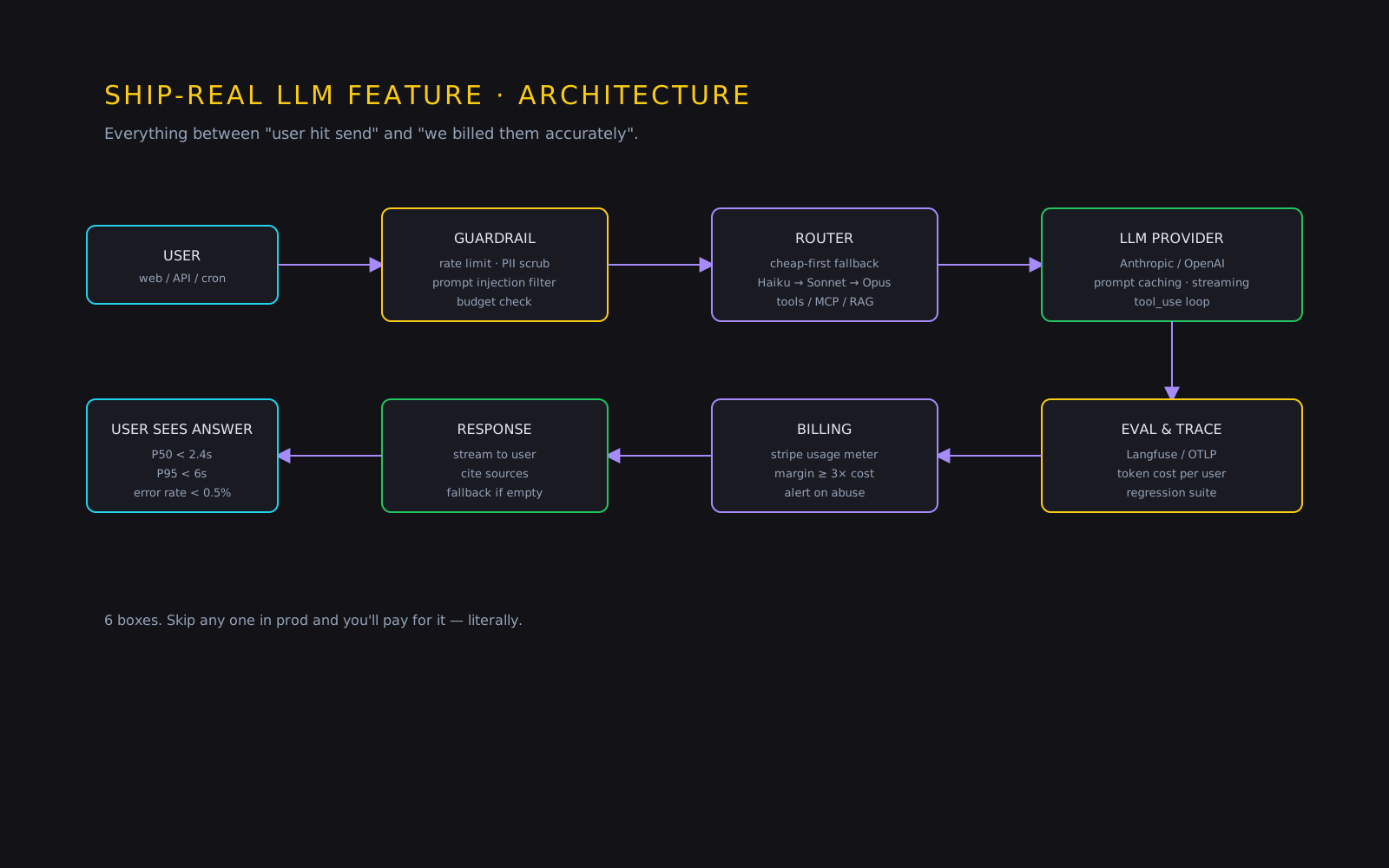
What real LLM features look like in production
Two examples I’ve shipped, both still running, both billing real users:
Dealko is the first AI assistant for the Slovenian telecom market. Users ask, in Slovenian, things like “I need a plan with at least 20GB and EU roaming under €25.” The LLM parses intent, matches against a real operator catalog, and surfaces actual options the user can act on. When the model’s confidence drops — ambiguous query, missing data, edge case — it gracefully hands off to a human sales path instead of confabulating an answer. The LLM is one component, not the whole product. See Dealko for the full case.
CrewPress is a 7-agent WordPress automation plugin. Content Generator, SEO Optimizer, Developer Assistant, Image Creator, and three more — each agent has a scoped responsibility, its own prompt template, and its own model choice. Usage quotas are enforced per Stripe subscription tier so a power user on the cheapest plan can’t accidentally burn through a month’s API budget in an afternoon. See CrewPress for the architecture.
Both ship to real users. Both have failure modes built into the UX, not hidden from it. Both bill costs cleanly to the subscription that pays for them.
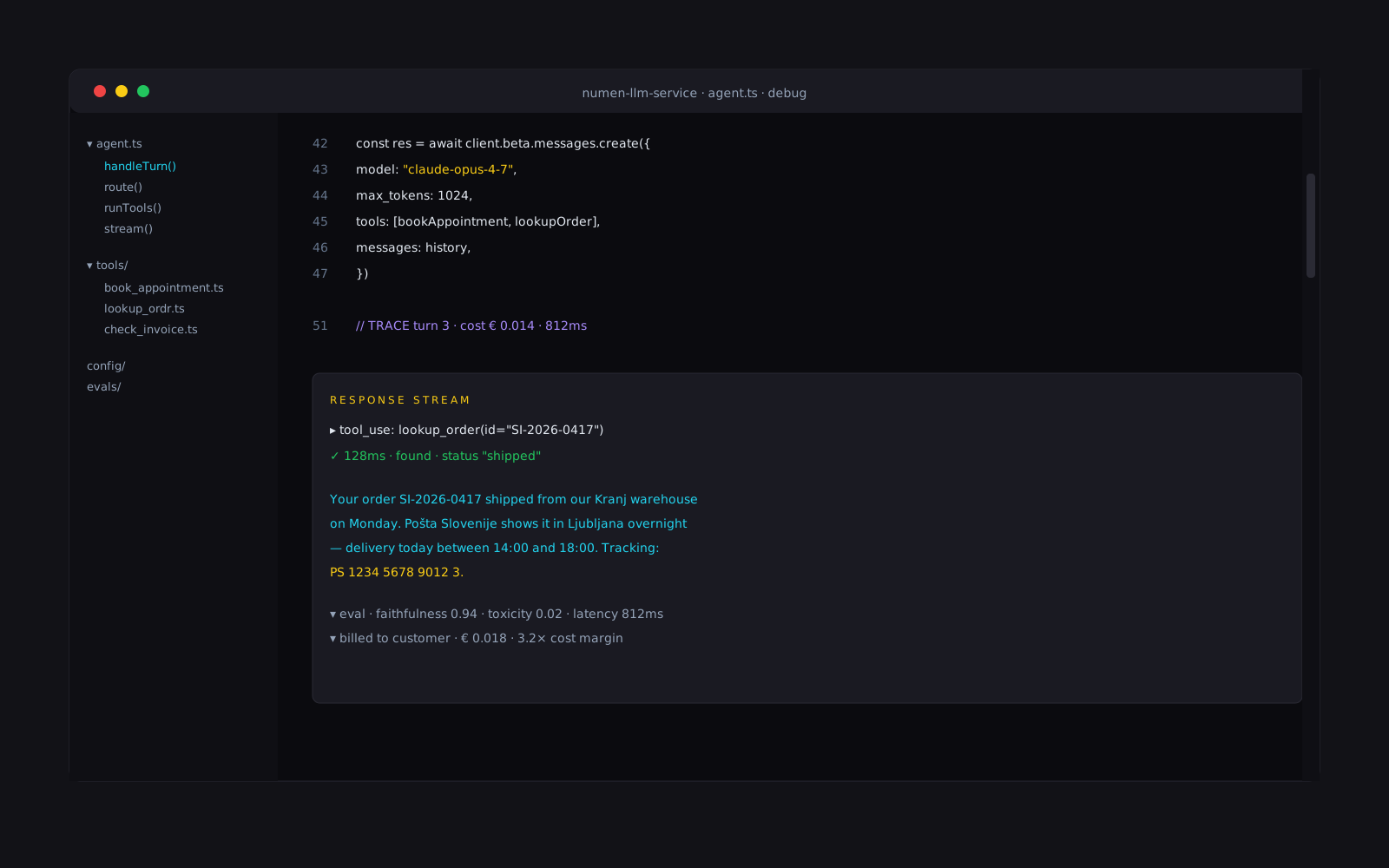
The shippable LLM feature checklist
A pre-launch gate I run with founders before we agree the feature is ready:
- Does it solve a problem deterministic logic can’t?
- Is the model choice grounded in your workload, not benchmarks?
- Is hallucination either guarded against or shown honestly?
- Are costs capped per user and per tier?
- Is latency masked by UX — streaming, skeleton states, progressive disclosure?
- Is the model version pinned and an eval suite in place?
- Is the context-management strategy decided — RAG, summarisation, or window-only?
- Does it gracefully degrade when the LLM is down or rate-limited?
If you can’t tick all eight, the feature isn’t ready. It’s still a demo.
An LLM feature that ships is 20% prompt and 80% engineering hygiene. The prompt is the part founders obsess over. The other 80% is what decides whether the feature is alive in a year.
If you have an AI feature in your roadmap and want a sanity check, book a free 30-minute call or see the AI integration page for what an engagement looks like. For a broader map of where AI actually saves an SMB an hour a day, see AI for small businesses in 2026; if you want to see the pattern applied end-to-end, browse our recent work.
